Build a Job Queue with Standalone Activities

Introduction
By Nikolay Advolodkin, Staff Developer Advocate at Temporal
Standalone Activities are Temporal's durable job queue. You write a regular @activity.defn and submit it with one API call. Temporal persists it, retries it on failure, and makes it visible in the UI, with no broker, scheduler, or result store for you to operate.
When something happens in your application, such as a payment clearing, an order shipping, or a user signing up, you POST to a URL another team gave you. Doing it durably means three things: retry if the network fails, retry if the receiver returns a 500, and never double-deliver if your service crashes mid-send.
What you'll learn
By the end you'll be able to:
- Submit an Activity as a durable, addressable job with
client.execute_activity/client.start_activity. - Make retries safe with an idempotency key so a crash can't double-deliver.
- Reject duplicate submissions at the server with
ActivityIDConflictPolicy.USE_EXISTING. - Cap dispatch rate with
max_activities_per_secondand prioritize urgent work. - Heartbeat a long-running Activity and resume it from the last checkpoint after a crash.
- Reuse the exact same Activity as a step inside a Workflow, with no rewrite.
Prerequisites
- Familiar with Temporal Activities and Workers at the level Temporal 101 in Python covers.
Run the lab in your browser (recommended)
This tutorial is built as a Free, hands-on Instruqt lab. Nothing to install: the Temporal Service, the Web UI, and a webhook receiver all boot with the sandbox, so you start writing code immediately.
Run the code locally (optional)
Prefer to run it yourself? Clone the course repo and start the pieces the sandbox normally boots for you:
You'll need a few things installed first:
- Git.
- Python 3.11 or newer.
- uv, the Python package manager the course repo uses.
- The Temporal CLI, which provides the local dev server. Use a recent version so the Standalone Activities features (the
Standalone ActivitiesUI tab,temporal activitycommands, conflict policies) are available.
git clone https://github.com/temporalio/edu-standalone-activities.git
cd edu-standalone-activities/python/course-repo
uv sync
Then, in separate terminals:
# Webhook receiver (records what your Worker delivers)
uv run python server/webhook_receiver.py

# Temporal dev server + Web UI on http://localhost:8233
temporal server start-dev --ui-port 8233

# A module's Worker
cd exercise/01-durable-job-queue
uv run python -m webhooks.worker

# Submit a job (in another terminal, from the same module folder)
uv run python -m webhooks.send_standalone evt_001
curl http://localhost:9000/_received
Each module has parallel exercise/<NN> (starter code with TODO markers) and solution/<NN> folders. If you get stuck, diff your work against the matching solution/ folder.
You may hit environment setup issues (Python version, dependencies, port conflicts, Temporal CLI installation) that we can't control or support. The Instruqt lab is the supported path. Use localhost only if you're comfortable troubleshooting your own setup.
Module 1: Submit a durable job with one API call
Running background jobs the traditional way means wiring up several moving parts yourself: a broker to hold the jobs until something runs them, a scheduler to decide when they run, and retry logic re-written in every service. Glue those together and you've built a Tier-0 system (one everything depends on, so it can never go down) that someone has to keep alive. Temporal doesn't make those concerns disappear, but it consolidates them onto one platform instead of four systems you stitch together. You write a regular @activity.defn and submit it with a single call; Temporal holds the job, schedules it, and retries it for you:
@activity.defn  # a regular Activity; nothing here marks it "standalone"
def deliver_webhook(req: WebhookDelivery) -> int:
    response = httpx.post(req.url, json=req.payload, timeout=5.0)
    response.raise_for_status()  # a 4xx/5xx raises, so Temporal retries
    return response.status_code
await client.execute_activity(
    deliver_webhook,
    args=[WebhookDelivery(...)],
    id="deliver-evt_001",
    task_queue=TASK_QUEUE,
    start_to_close_timeout=timedelta(seconds=10),
)
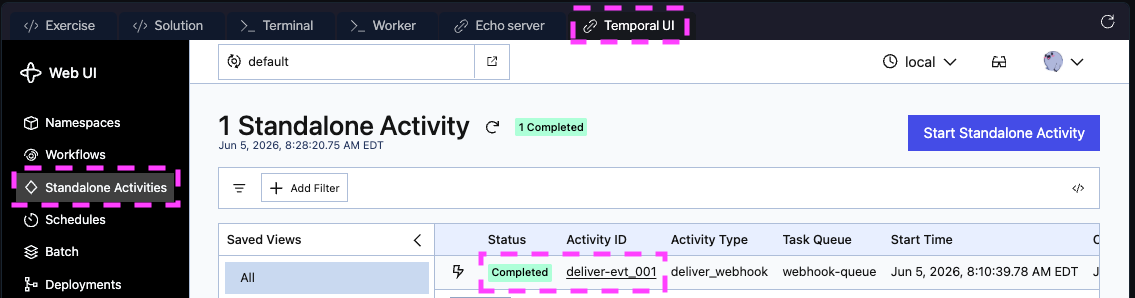
There's no "standalone" decorator and no Workflow class. Standalone versus inside-a-Workflow is decided by how the Activity is called, not how it's defined. The job is addressable (a stable ID you can query, cancel, or terminate), durable (persisted before your Worker sees it), and observable in the Temporal UI under the Standalone Activities tab:
To be clear about what doesn't change: your application's own data still lives in your database, and someone still operates Temporal (your team, or Temporal Cloud). What you stop doing is running a separate broker, scheduler, and retry layer and wiring them together.
Check your understanding: your job hits a transient 503 on attempt 1. With Temporal's default retry policy, what happens?
Answer
Temporal sees the exception, waits the initial retry interval (1s by default), and dispatches the job again with exponential backoff. You wrote no retry code; you configured it on the Activity options. The job stays "Running" in the UI and the attempt counter increments. In a traditional job queue, that retry behavior is something you re-implement per service.
Never miss a new tutorial
Be the first to know when we ship new tutorials, courses, and hands-on guides. No spam, unsubscribe anytime.
Join the Temporal education list →
No spam, unsubscribe anytime.
Module 2: Make retries safe with idempotency
Temporal guarantees your Activity runs to completion at least once, not exactly once. If the POST lands and then the attempt errors (a 500, a dropped network, a Worker crash after the POST), Temporal retries the whole Activity body and the receiver gets the same delivery twice. The fix is a stable idempotency key the receiver dedupes on:
headers = {"Idempotency-Key": f"webhook:{req.event_id}"}
The key is derived from the logical event id, so it's identical across every retry of that event. Don't use uuid.uuid4(): a fresh key per attempt dedupes nothing. At-least-once delivery (Temporal) + idempotency (your Activity and receiver) = effectively-once side effects.
Step through the with/without comparison:
Check your understanding: your Activity builds the
Idempotency-Keyfrom arandom.choice(...)discount code generated inside the Activity. What breaks on retry?
Answer
Each retry generates a different random code, so the key changes per attempt and the receiver accepts every one. Make the key deterministic across retries: derive it from input the caller chose (req.event_id), or for workflow-bound Activities use workflow_run_id + activity_id. If you need the random value as part of the side effect, generate it in the caller and pass it in as input.
Module 3: Reject duplicate jobs at the platform
Module 2 handled Temporal's own retries. This module handles a different duplicate: your upstream (Stripe, GitHub, a customer's service) sends the same event twice and you call start_activity twice. By default the second call raises ActivityAlreadyStartedError. One keyword makes the server return the existing handle instead:
from temporalio.common import ActivityIDConflictPolicy

await client.start_activity(
    deliver_webhook,
    ...,
    id_conflict_policy=ActivityIDConflictPolicy.USE_EXISTING,
)
Both calls now succeed with the same run_id, and the duplicate never reaches a Worker. This is scheduling-layer dedup; it composes with the receiver-side idempotency key from Module 2.
Check your understanding: with
USE_EXISTINGset, you callstart_activity(id="evt_001")twice, but the second call arrives 60 seconds after the first one already completed. What happens?
Answer
A new execution starts. id_conflict_policy only governs duplicates while the original is in flight. Once it completes, id_reuse_policy takes over, and its default (ALLOW_DUPLICATE) accepts a fresh run. For dedup across both windows, also set id_reuse_policy=ActivityIDReusePolicy.REJECT_DUPLICATE.
Module 4: Cap throughput and prioritize urgent jobs
By default the Worker executes Activities as fast as it can process them, which may be faster than the downstream service allows. If the receiver is rate-limited, you will get a flood of "Too Many Requests" errors and climbing retry counts:
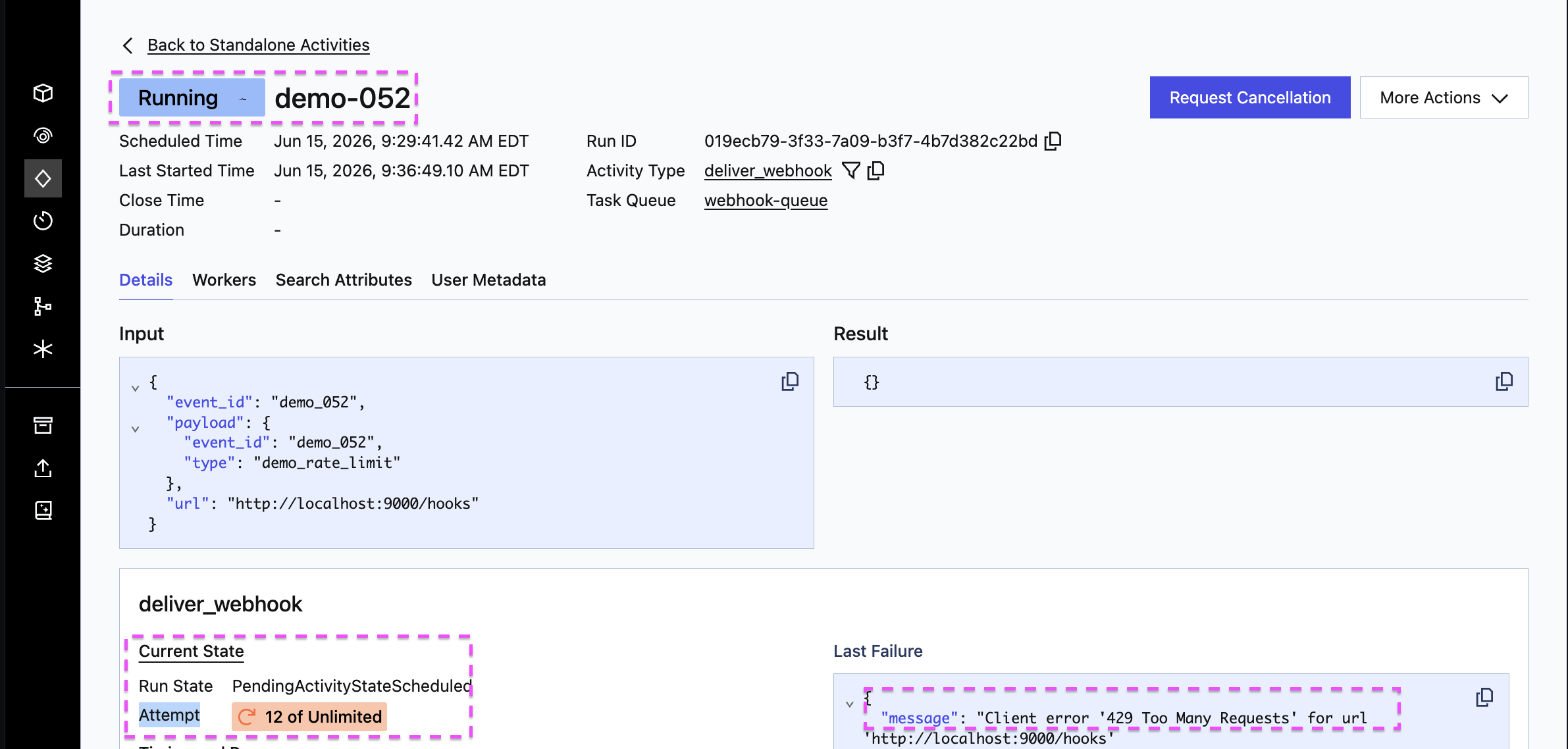
The problem here isn't one slow job; it's the combined request rate of every delivery hitting a receiver that only allows so many per second. Temporal retries each Activity on its own, which fixes a one-off failure but can't fix a total-rate problem: every retry is just another request piling onto an already-overloaded receiver. The fix is to slow how fast the work goes out. One keyword on the Worker does it:
worker = Worker(
    client,
    task_queue=TASK_QUEUE,
    activities=[deliver_webhook],
    activity_executor=executor,
    max_activities_per_second=2.0,  # cap how fast this Worker starts Activities
)
Excess work waits in the Task Queue on the server, dispatched at the configured rate. Nothing is dropped. The companion control is Priority(priority_key, fairness_key, fairness_weight): a lower priority_key jumps urgent work ahead of a backlog, and the fairness fields stop one busy tenant from starving the rest. See Task Queue Priority and Fairness.
Check your understanding: your downstream API allows 100 req/sec. You set
max_activities_per_second=10on one Worker. Are you safe?
Answer
For this exact setup, one Worker, yes, but you're only using 10% of the downstream's 100 req/sec headroom. The catch: max_activities_per_second is per Worker, not global. Add a second Worker and you're at 20/sec; run 11 and you're at 110/sec, past the limit. So "safe" only holds while the Worker count stays fixed. For a cap that holds no matter how many Workers poll the queue, use max_task_queue_activities_per_second.
Module 5: Heartbeat progress and resume after a crash
A Standalone Activity that processes a batch can run for minutes. If the Worker crashes mid-batch, you don't want the retry to redo everything. Standalone Activities have heartbeats built in: activity.heartbeat(progress) stores a checkpoint on the server, and the next attempt reads it back:
start_index = 0
if info.heartbeat_details:
    start_index = info.heartbeat_details[0]  # resume from the last checkpoint
Pair it with heartbeat_timeout so the server detects a dead or stuck attempt in seconds instead of waiting out the full start_to_close_timeout. Heartbeating is also how cancellation reaches a running Activity. No side database required.
Check your understanding: your batch Activity has
heartbeat_timeout=5sand processes one item per second. Mid-batch the Worker hangs (a deadlock, not a crash) and stops heartbeating. What does Temporal do?
Answer
After 5 seconds with no heartbeat, Temporal treats the attempt as dead, the same as a crash, and schedules a retry on whatever Worker picks it up next. That's the point of heartbeat_timeout: a liveness signal that lets the server route around a stuck Worker quickly, rather than waiting for the much longer start_to_close_timeout.
Module 6: Same code runs anywhere
Traditional job queues paint you into a corner: the queue runs jobs, orchestration lives elsewhere, and code gets rewritten when a job becomes multi-step. With Temporal, the exact same Activity runs both ways. Submit deliver_webhook directly or call it as a step inside a Workflow:
with workflow.unsafe.imports_passed_through():
    from .activities import deliver_webhook  # the SAME function

@workflow.defn
class WebhookWorkflow:
    @workflow.run
    async def run(self, req: WebhookDelivery) -> int:
        return await workflow.execute_activity(
            deliver_webhook,
            req,
            start_to_close_timeout=timedelta(seconds=10),
        )
The Activity doesn't know whether it was invoked as a Standalone Activity or a Workflow step. That's the differentiator: one tool for jobs and orchestration. With Temporal the same Activity becomes a step in a Workflow on the same platform: same retries, timeouts, and visibility, and no second system to run.
At Replay 2026, Coinbase described migrating their custom Background Jobs Service, which handles 200–600 million jobs per day across 186 namespaces, onto Standalone Activities, letting one platform replace a separate job queue and orchestrator. (Watch the talk.)
Wrap-up
You now know how to use Standalone Activities in Python to:
- Submit a durable job with
client.execute_activity/client.start_activity, no Workflow required. - Make retries safe with a stable idempotency key for external writes.
- Dedup duplicate submissions at the server with
ActivityIDConflictPolicy.USE_EXISTING. - Pace and prioritize with
max_activities_per_secondandPriority. - Checkpoint long-running jobs with
activity.heartbeat()+heartbeat_timeout. - Reuse the same Activity from a Workflow when the work grows into orchestration.
Temporal lets you start with a job and move to a Workflow when the work grows, and the Activity code comes with you.
Ready to build it for real? Launch the hands-on lab using the sign-up form at the top of this page.
📝 Feedback on this tutorial? Share your thoughts in our quick form. It helps us improve.